Field service teams live and die by two numbers: hours worked and hours paid correctly. When those numbers travel between systems by hand, through spreadsheet exports and manual entry, the gap between them grows every pay cycle. This guide breaks down how to connect Zuper and Paycom with a custom middleware layer so completed jobs turn into accurate, on time paychecks without anyone re-typing a timesheet.
TL;DR
- Manual payroll processing and paper timecard entry inflate operating costs by up to 8 percent due to rounding errors and corrections, and unresolved payroll handoff issues commonly add 4.8 to 14 hours per week of administrative overhead.[9]
- Zuper's REST APIs (Jobs, Users, Timesheets) can trigger the moment a job is marked complete, giving you a real time event to build automation around.[1][2]
- Paycom does not offer a fully open public API. Access requires either an authorized customer relationship with Paycom or a partner unified API layer, which is why a direct, off the shelf connector rarely exists between Zuper and Paycom.[3][11]
- Paycom's Punch Import API is the specific endpoint built for this job. It accepts punches, hours, and earnings in real time and requires at least one employee identifier plus a punch time in UNIX format.[4]
- A Laravel based middleware layer gives you webhook handling, queued retries with backoff, and audit logging, three things a point to point integration cannot offer on its own.[10]
Why Integrate Zuper with Paycom?
Field service companies typically run two separate systems of record: a field service platform that knows when work actually happened, and a payroll platform that pays people for it. Without a bridge between the two, someone has to manually reconcile the difference every pay period.
Eliminate Manual Payroll Data Entry
Every manual step, exporting a spreadsheet, re-keying hours, correcting a mismatched employee ID, is a place where duplicate work and human error creep in. Studies on manual data entry put the human error rate at roughly 1 to 4 percent of fields under normal working conditions, compared to under 0.1 percent for well tuned automated systems.[6][7] Payroll is one of the worst places for that gap to show up, since a wrong entry does not just cost time to fix, it costs employee trust.[8]
Reduce Payroll Errors with Automated Time Tracking
When technician hours flow directly from a completed Zuper job into Paycom, overtime calculations and completed job records stay in sync automatically. Independent workflow analysis on payroll handoff shows that unresolved manual processes routinely produce a 3 to 8 percent operational error rate, and payroll corrections alone can eat up 1 to 3 percent of gross payroll.[9]
Speed Up Payroll Processing for Field Service Teams
Real time synchronization means payroll administrators spend their time reviewing exceptions instead of re-entering every technician's hours from scratch. That shift alone can reclaim the 4.8 to 14 hours per week that manual payroll handoff typically consumes.[9]
Common Payroll Challenges Field Service Companies Face
Technician Hours Recorded in Multiple Systems
Dispatch, job completion, and timesheets often live in Zuper, while pay rates, tax profiles, and earning codes live in Paycom. Without integration, someone has to manually match those two worlds every pay period.
Payroll Delays Caused by Manual Imports
Batch exports and manual file imports mean payroll cannot close until someone has finished a manual reconciliation pass, which pushes processing closer to the payroll deadline every single cycle.
Incorrect Time Entries and Missing Punches
A missed clock out, a mistyped employee code, or a job marked complete without a corresponding timesheet entry all create downstream payroll exceptions that are expensive to catch after the fact.[7]
Limited Visibility Between Dispatch and Payroll
Dispatchers and payroll teams often cannot see each other's data in real time, so questions like "did this technician actually work this job" require a phone call instead of a quick lookup.
How the Zuper to Paycom Integration Works
The cleanest way to connect these two platforms is an event driven flow: a completed job in Zuper triggers a webhook, a middleware layer picks it up, validates it, reshapes it into the format Paycom expects, and pushes it through the Punch Import API.[1][4]
Step 1: Completed Job Triggers a Zuper Webhook
When a technician marks a job complete in the Zuper mobile app, a webhook event fires to your middleware endpoint with the job ID and basic metadata.
Step 2: Middleware Retrieves Job, User, and Timesheet Data
The middleware calls Zuper's Jobs, Users, and Timesheets APIs to pull the full picture: who worked the job, what time they started and ended, and any associated categories or cost codes.[1]
Step 3: Validate Employee and Job Information
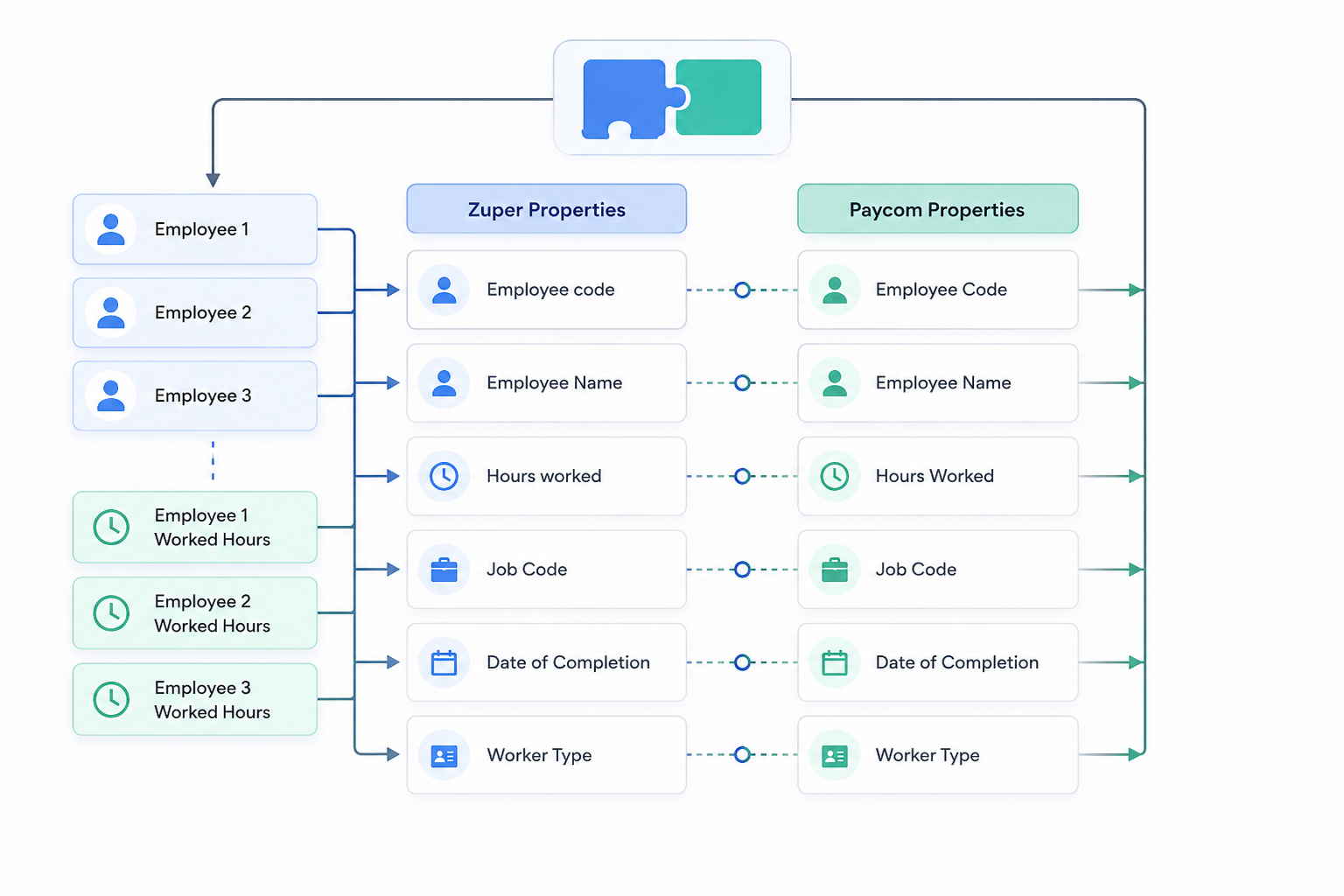
Before anything touches payroll, the middleware checks that the employee exists, that their Paycom employee code or badge number is on file, and that the timesheet has both a start and end time. Bad data gets flagged and queued for review instead of silently failing.
Step 4: Transform Data into Paycom Punch Import Format
Zuper's timesheet fields get mapped into the structure Paycom's Punch Import API expects, including the employee identifier, punch time in UNIX format, department code, and any category or earning code fields needed for accurate cost allocation.[4]
Step 5: Send Employee Time Records to Paycom Automatically
The middleware posts the formatted punch to Paycom's Punch Import API, which supports adding, editing, or deleting time clock events on an employee's time card in real time.[4] Paycom returns a punch ID and punch body confirming the record was created, which the middleware logs for audit purposes.
Workflow at a glance:
Technician
    ↓
Complete Job in Zuper
    ↓
Webhook Fires
    ↓
Laravel Middleware
    ↓
Zuper APIs (Jobs, Users, Timesheets)
    ↓
Data Validation
    ↓
Paycom Punch Import API
    ↓
Payroll Ready
APIs Required for a Successful Zuper Paycom Integration
Zuper REST APIs
Zuper exposes REST APIs for authentication, jobs, users, and timesheets, which developers can use to migrate data and build custom integrations without needing to touch Zuper's underlying database.[1][2]
Paycom Punch Import API
Paycom is not an open platform in the way most SaaS tools are. Access generally requires being an existing Paycom customer with API access provisioned by a Paycom representative, or a formal commercial partnership with Paycom, and the approval process can take time and involve real cost.[3][11] Once access is granted, the Punch Import API requires at least one employee identifier (badge, employee code, or clock sequence number) along with the punch time in UNIX format, plus optional fields for department code, categorization, punch type, and earning codes.[4]
Why Use Middleware Instead of a Direct Integration?
Because Paycom's API access is gated and its schema is proprietary and can vary by implementation, a thin middleware layer between Zuper and Paycom is not optional complexity, it is the only realistic way to build and maintain this connection.[3]
Better Error Handling
A middleware layer can catch a malformed timesheet or a missing employee code before it ever reaches Paycom, instead of letting a bad record silently corrupt a pay run.
Queue Failed Payroll Requests
Processing webhooks through a queue keeps your application responsive and ensures no completed job gets lost if Paycom's API is briefly unavailable.[10]
Retry Failed API Calls Automatically
Laravel's queue system supports configurable retry attempts with exponential backoff, so a transient network issue does not mean a technician's hours disappear. A typical pattern retries after 15, 30, and 45 minute intervals before flagging the record as failed for manual review.[10]
Secure Authentication Management
Middleware centralizes credential storage for both Zuper and Paycom, so API keys and tokens are not scattered across scripts or exposed in client side code.
Easier Future Integrations
Once you have a service layer that understands your job and timesheet data, adding a third system, like a GL export or a BI dashboard, is a much smaller lift than starting from scratch.
Building the Integration Using Laravel
Receiving Webhook Events
A dedicated controller endpoint receives the Zuper webhook payload, verifies its signature, and dispatches a queued job to handle the heavy lifting asynchronously so Zuper's webhook call returns quickly.[10]
Processing Queue Jobs
Each queued job implements Laravel's ShouldQueue contract, which means it runs in the background, can be retried automatically on failure, and will not block the rest of your application if Paycom is temporarily slow to respond.[10]
Service Layer Architecture
Separate service classes for ZuperService and PaycomService keep the API specific logic isolated, so changes to either vendor's API do not ripple through your entire codebase.
Data Objects for Clean Mapping
Simple data transfer objects that represent a "Zuper Timesheet" and a "Paycom Punch" make the field mapping explicit and easy to test, instead of passing loosely typed arrays between functions.
Logging and Monitoring
Every webhook received, every punch sent, and every failure should be logged with enough context to answer "what happened to this technician's hours" without digging through raw API responses.
Mapping Zuper Data to Paycom Payroll Fields
Security Best Practices for Payroll Integrations
OAuth Authentication
Use OAuth backed tokens rather than static API keys wherever both platforms support it, and rotate credentials on a regular schedule.
Webhook Verification
Verify webhook signatures before processing any payload so your middleware cannot be tricked into creating punches from a spoofed request.
Encrypted API Credentials
Store Zuper and Paycom credentials encrypted at rest, never in plain text configuration files or version control.
Audit Logs
Every punch created, modified, or deleted through the integration should leave a permanent audit trail, since payroll discrepancies are far easier to resolve when you can trace exactly what was sent and when.
Queue Monitoring
Set up alerts for jobs that land in a failed queue so a stuck payroll record gets a human's attention long before a pay run closes.
Benefits of Automating Payroll with Zuper and Paycom
Save Hours Every Payroll Cycle
Removing manual reconciliation can reclaim the hours field service companies typically lose to payroll handoff every week.[9]
Eliminate Duplicate Data Entry
Technician hours are entered once, in the field, and flow automatically from there.
Improve Payroll Accuracy
Automated systems can reach accuracy rates north of 99.9 percent on structured fields, compared to 96 to 99 percent for manual entry, which matters enormously when the field in question is someone's paycheck.[6]
Faster Employee Payments
Technicians get paid accurately and on time, without waiting on a manual export cycle to catch up with the work they already completed.
Better Reporting Across Operations
With job data and payroll data flowing through one pipeline, reporting on labor cost per job or per technician becomes far more reliable.
Real World Example: From Completed Job to Payroll in Seconds
A technician completes a work order in the field. Zuper fires a webhook the instant the job is marked done. The middleware validates the employee and timesheet data, transforms it into Paycom's punch format, and creates the employee punch in Paycom automatically. By the time the payroll team opens their dashboard, the only thing waiting for them is a short list of exceptions, not a full day of manual entry.
When Should You Build a Custom Zuper Paycom Integration?
This kind of integration makes the most sense if you:
- Manage 20 or more field technicians
- Process payroll weekly or biweekly
- Use Zuper for dispatch and job management
- Use Paycom for payroll
- Want to eliminate manual exports for good
- Need real time payroll synchronization rather than batch imports
Why Choose Computan for Zuper and Paycom Integrations
Computan builds custom middleware for companies that have outgrown manual payroll workarounds. Our team brings hands on Laravel expertise, experience connecting HubSpot and ERP systems, and a disciplined approach to webhook automation, API architecture, error handling, and queue processing. We deploy on Google Cloud and stay with you for long term support, not just the initial build, so your integration keeps working as Zuper and Paycom evolve their own APIs.
Frequently Asked Questions
Can Zuper integrate directly with Paycom?
Not out of the box. Zuper offers open REST APIs for jobs, users, and timesheets, but Paycom does not provide a fully open public API, so a direct, plug and play connector between the two does not exist today. A custom middleware layer is the standard approach.[1][3]
Does Paycom offer APIs for payroll imports?
Yes, through its Punch Import API, which accepts employee punches, hours, and earnings in real time once you have API access provisioned by Paycom or through a partner integration layer.[4]
What data can be synced between Zuper and Paycom?
Employee identity, job completion timestamps, clock in and clock out times, and hours worked are the core fields, with department codes and earning codes available for more detailed cost allocation.[4]
Can technician timesheets be sent automatically to Paycom?
Yes. Once a job is marked complete in Zuper, a webhook can trigger middleware that pulls the timesheet, validates it, and sends it to Paycom's Punch Import API without any manual entry.[1][4]
Is middleware required for a Zuper Paycom integration?
In practice, yes. Paycom's restricted API access and proprietary schema make a direct integration impractical for most companies, so middleware is what handles authentication, data transformation, and error recovery.[3]
How long does it take to build a custom payroll integration?
Timelines vary based on Paycom API access approval and the complexity of your Zuper job and cost code structure, but a focused middleware build typically moves faster once API credentials for both platforms are confirmed.
What happens if the Paycom API is unavailable?
A properly built middleware layer queues the request and retries automatically with increasing delays between attempts, so a temporary outage does not mean lost timesheet data.[10]
Can multiple technicians on one job be synced to payroll?
Yes. The middleware processes each technician's timesheet entry independently, so a multi technician job creates one punch per employee in Paycom.
Conclusion
Integrating Zuper with Paycom eliminates manual payroll processing, improves accuracy, and creates a seamless workflow from completed field jobs to payroll. Because Paycom does not offer an open public API, custom middleware is not a nice to have, it is the piece that makes the whole integration possible, handling authentication, data transformation, error recovery, and scalability so your payroll team can spend their time reviewing exceptions instead of re-entering hours.
Sources:
- Zuper: Field Service Management Software
- Zuper: Field Service Management Integrations
- Knit: Paycom API Integration Guide
- Knit Developers: Paycom API Use Cases (Punch Import API)
- ApiX-Drive: Paycom API Integration
- DocuClipper: 67 Data Entry Statistics for 2025
- Lido: Data Entry Error Rates and Cost
- PeopleXCD: Cost and Likelihood of Inaccuracy in Manual Data Handling
- Simply Connected Systems: Payroll Data Entry and Timesheet Process
- Laranepal: Laravel Webhook Integration, Handling Errors and Retries
- Finch: Paycom Integration