Isn’t it common practice to send an automated follow-up email to the prospects who don’t reply? It’s common practice to design a workflow with 4-5 emails in it that will be sent over the next 3-4 weeks. We also wanted something similar for our website form fillers or prospects.
When someone signs up on our website and submits a genuine query like asking a serious question about our services or explaining a problem they’re facing, and they need web development work done, one of our project managers reaches out to them personally via email.
The goal of the email is to know more about their queries, or get on a call, or have a quick meeting to discuss things further. Everything is tracked and recorded in HubSpot because the website, forms, and CRM everything is in HubSpot.
But here’s what was happening:
If the prospect didn’t reply, the PM would send another email. But sometimes… they would forget. Missed follow-ups mean missed opportunities. We needed to plug this hole.
Our first thought was to automate the whole process so that there’s no space for human errors. If a prospect doesn’t reply, shoot them another email a few days later automatically.
But Bratislav Brankovic, one of our HubSpot Project Managers, wasn’t on board.
He shared a sales lesson from Rick Roberge: If the prospect is genuine, talk to them personally. Don’t send automated follow-ups.
And honestly, he was right. That kind of workflow would feel cold and impersonal. The workflow would have done more damage than good to us.
Then Bratislav Brankovic came up with an idea. Instead of sending another email to the prospect, let’s send a notification email to the PM if there’s no reply from the prospect after 7 days. Just a gentle reminder to the PM to follow up manually.
Everyone agreed this was a better solution.
So, our HubSpot Admin, Michael Stephen, designed the internal notification email. It’s personalized, it includes the prospect’s name, the contact owner’s name, and other useful bits. Michael set up the workflow. Now, PMs get reminded to follow up without spamming the prospect.
Here's what the workflow looked like
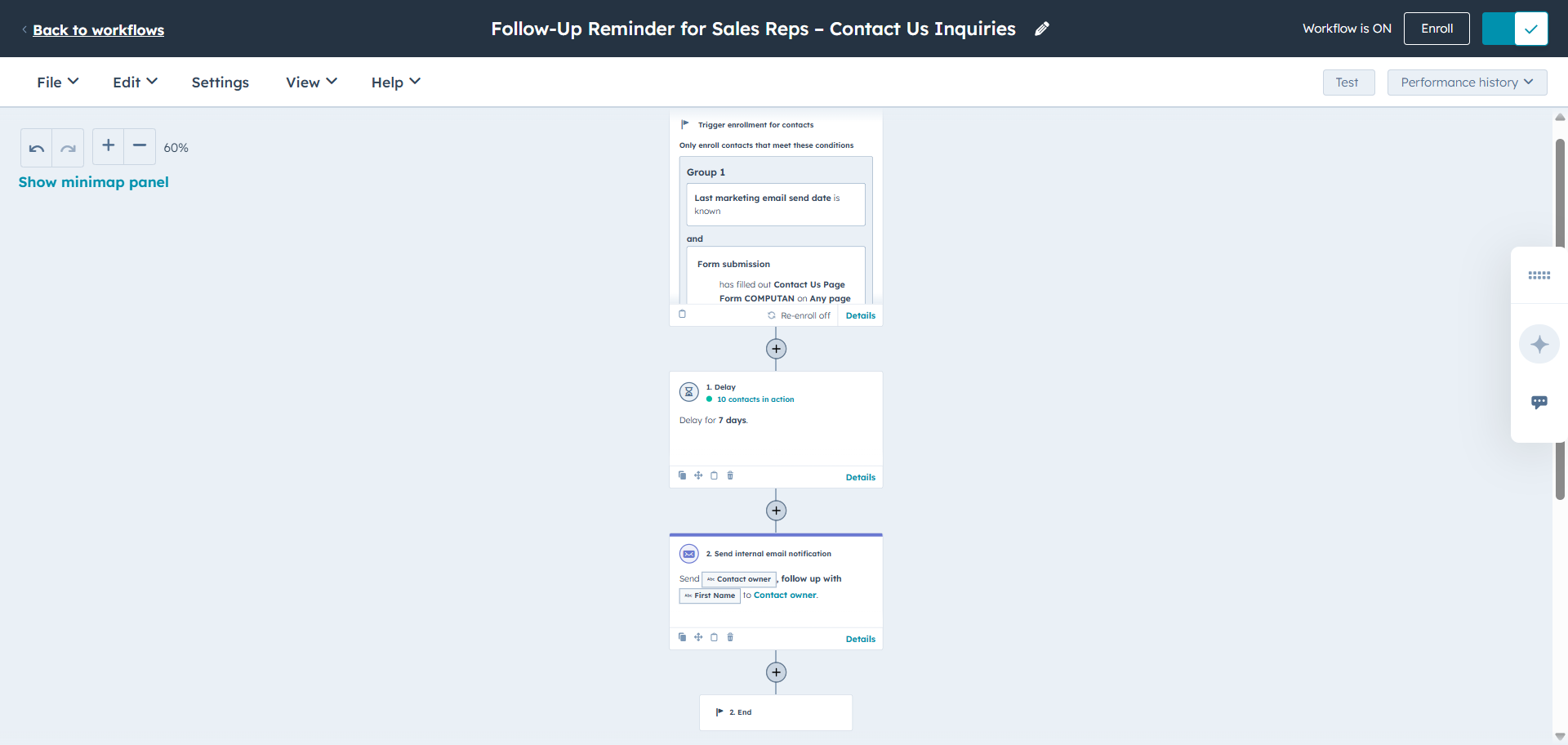
We set the 'last email sent date' and 'form-filling' as a combined trigger. Once the contacts fulfill both these conditions, we add a delay of 7 days. After 7 days of delay, an email will be sent to the respective PM or the contact owner to follow up on the prospect.
There is no re-adding of the contacts in the workflow.
Also, note, when a form is submitted, a notification already goes to the Project Managers to send the first email.
A couple of sales lessons from this:
Automation should never replace real human interest.
When a prospect shows genuine intent, treat it with care. A quick, personal email or call carries much more weight than an automated sequence.
Follow-up isn't just about persistence, it’s about timing.
Don’t leave it to memory. Set up internal reminders and alerts so you can follow up thoughtfully, not desperately. Sometimes, the best workflows are the ones that don't contact the customer directly.
Frequently Asked Questions
What defines a “smart” follow-up email workflow versus a basic drip sequence?
Answer: A smart follow-up workflow listens and reacts; a basic drip sequence just talks.
Smart workflows:
- Change paths based on opens, clicks, replies, or inactivity
- Adjust timing automatically
- Pull in relevant context
- Use branching logic to avoid irrelevant messages
- Include multiple channels
Drip sequences:
- Same timing
- Same messages
- No logic
- No responsiveness to lead signals
What metrics and KPIs should we track to measure if the follow-up workflow is working?
Answer:
- Engagement metrics: open rate, click rate, response rate
- Pipeline metrics: meetings booked, SQLs created, opportunities generated
- Efficiency metrics: time-to-engage, follow-up completion rate
- Quality metrics: sentiment of replies, lead qualification accuracy
- Risk metrics: unsubscribe rate, spam complaints
How do you personalize follow-up workflows at scale while avoiding spam filters or fatigue?
Answer: The blog is about internal team follow-up, but if you want to personalize follow-up workflows for leads, then we make automation feel human by pairing:
- Deep segmentation (role, industry, event conversations, last touchpoint)
- Intent-driven personalization (content they interacted with, questions they asked)
- Dynamic, rotating copy so repetition is avoided
- Engagement-aware throttling that slows or stops outreach

.jpg)